
We’re excited to announce the launch of the Cyberbro image on Kasm Workspaces as part of the Kasm Workspaces 1.18 update. This new feature enables cybersecurity professionals, analysts, and researchers to perform threat intelligence lookups and IoC (Indicators of Compromise) investigations easily within an isolated, browser-based workspace environment.
What is Cyberbro?
Cyberbro is a lightweight, multi-engine threat intelligence and reputation-checking tool designed to make analyzing observables like IP addresses, URLs, domains, and file hashes easier. Instead of requiring users to set up complex systems, Cyberbro provides a quick and effective way to query multiple intelligence services at once and generate actionable reports.
You can paste raw logs or IoCs, and Cyberbro automatically extracts, enriches, and correlates data across numerous public and private Cyber Threat Intelligence (CTI) platforms (enabled by API integrations).
Here are some of the features of Cyberbro (information extracted from Cyberbro’s GitHub repo):
- Easy Input: Paste raw logs or IoCs—automatic parsing and extraction
- Multi-Service Checks: Reputation lookup for IPs, hashes, domains, URLs, and Chrome extension IDs across many threat intel services
- Comprehensive Reports: Advanced search, filtering, and export to CSV/Excel.
- Fast Processing: Multithreaded for speed
- Automated Pivoting: Discover related domains, URLs, and IPs via reverse DNS and Registration Data Access Protocol (RDAP)
- Accurate Domain and Abuse Info: ICANN RDAP and abuse contact lookups
- History and Graphs: Analysis history and experimental graph view
About Kasm Workspaces
Kasm Workspaces provides a containerized streaming platform for delivering secure, web-based desktops and applications. Built on Docker and KasmVNC, Kasm enables users to run any app or tool - from browsers, single applications, to full Linux environments - directly in their browser without installing software locally.
It’s widely used for cybersecurity operations, remote research, developer environments, and data isolation use cases, providing a fully ephemeral workspace with customizable access controls, policy enforcement, and enterprise scalability.
Cyberbro + Kasm Workspaces
The new Cyberbro image for Kasm Workspaces brings powerful CTI tooling into a secure, ephemeral workspace. By combining Cyberbro’s investigative power with Kasm’s isolated streaming environment, teams can perform threat lookups and data enrichment securely without exposing local systems to risk.
This integration provides several key advantages:
- No Local Setup Required: Instantly spin up Cyberbro in a browser - no dependencies, API key leaks, or system configuration headaches.
- Enhanced Security: Run Cyberbro in a sandboxed Kasm container to safely handle suspicious IoCs or network data.
- Streamlined Access Control: Manage analyst access through Kasm’s built-in authentication, role-based policies/settings, and session isolation - ensuring that sensitive investigations remain contained within approved boundaries.
- Instant Reset and Scalability: Each Cyberbro workspace can be deployed or destroyed on demand, allowing teams to scale investigations instantly or reset environments between analyses for maximum operational hygiene.
Together, Cyberbro and Kasm make CTI workflows faster, safer, and more accessible.
How to Use Cyberbro in Kasm Workspaces
Using Cyberbro within Kasm is effortless.
- Install the Cyberbro Workspace: The Cyberbro image is available starting with Kasm Workspaces 1.18, if you are using an earlier release, an upgrade will be required. You can install the Cyberbro workspace directly from our official workspaces registry.
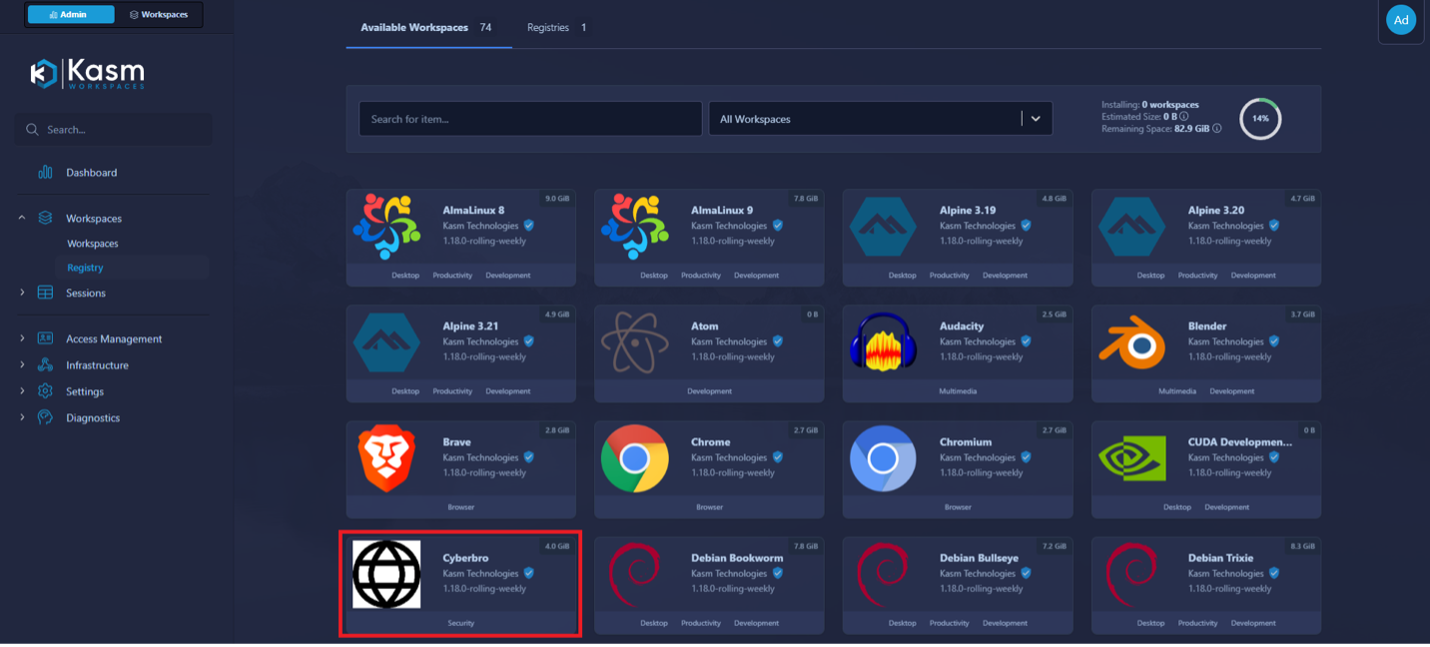
- Configure your Cyberbro workspace: You can easily pass multiple environment variables to your Cyberbro session (API keys for CTI integrations, proxy settings, user preferences, etc) to match your workflow. More information about the configurable options can be found on our Cyberbro Image Documentation.
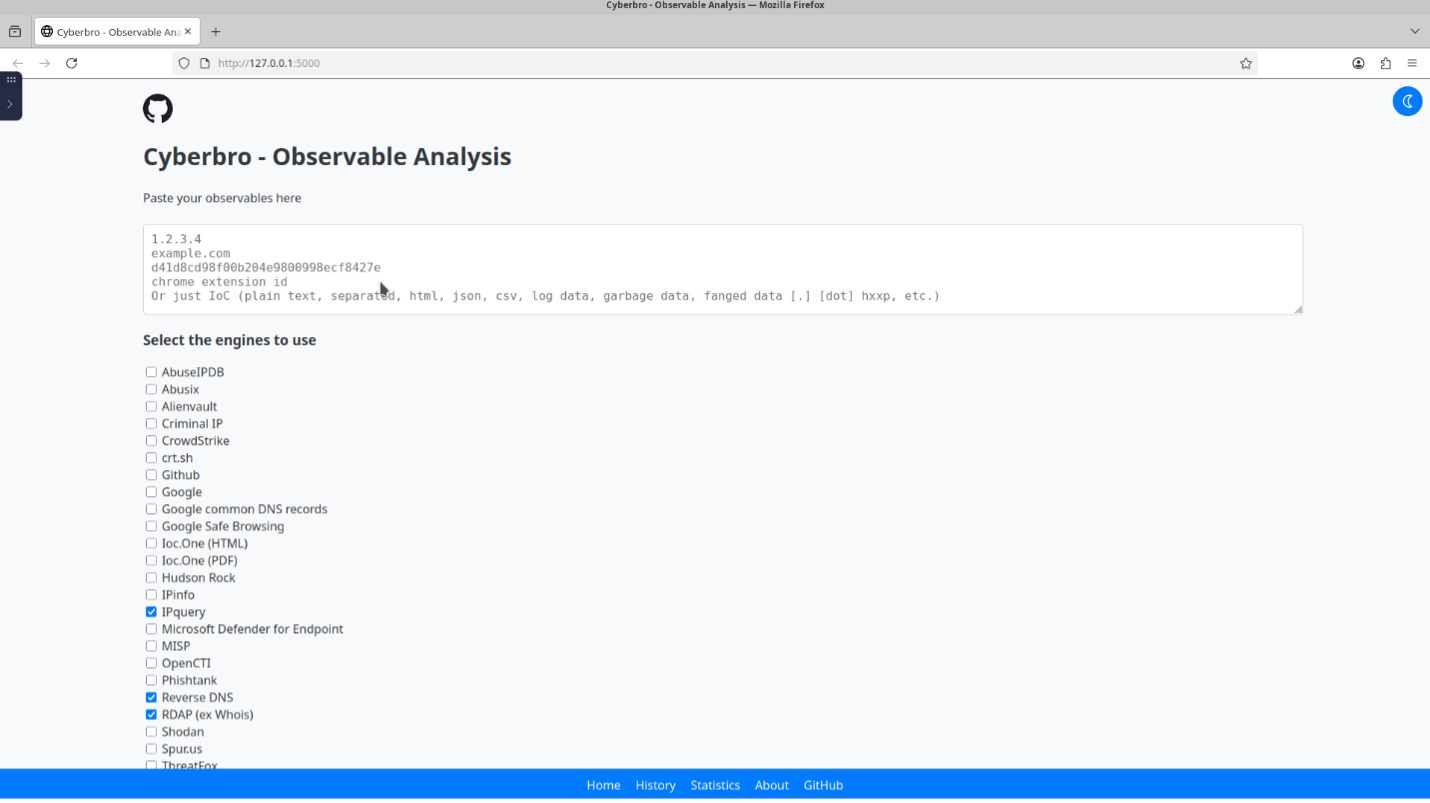
- Launch a Cyberbro session: Once installed, you can launch a Cyberbro Kasm session which spins up a container-based session running the Cyberbro web app. As soon as the session launches, you can see the Cyberbro Web App launches in a browser inside the session.
Special Thanks to stanfrbd, the creator of Cyberbro for building and maintaining this powerful open-source threat intelligence platform.