Developer API
Kasm allows developers to extend the systems functionality through the use of our API. The API receives and sends data as Json. The API keys are created by the admin on the Developers tab. The API key and secret are needed to use the service
API Keys
API Keys can be generated via the Developers tab. An API_KEY and API_KEY_SECRET will be automatically generated.
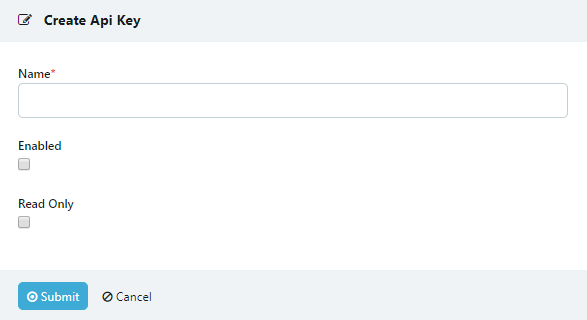
Creating an API Key
Authentication
The API key and secret must be sent with all of the following requests as json data.
{
    "api_key": "bMjMwTT0JKUQ"
    "api_key_secret": "KUNAvRw4KLHGmldBxhRUD5sAhWkvJVzS"
}
Request Kasm
Requesting a Kasm will create and start the container and assign a user to that Kasm.
Endpoint
/api/public/request_kasm
Arguments
- user_id* string:
An user Id can be specified to create the Kasm under that user. If no User ID is sent an anonymous user will be created and used for the Kasm.
- image_id* string:
An image id can be sent for the desired image. Otherwise the default image sent on the group or user level will be used.
- enable_sharing* boolean:
When the enable sharing flag is set to true the kasm will be created with sharing mode automatically enabled.
Optional
Response Format
- kasm_id string:
Returns the ID for the newly created Kasm.
- session_token string:
Returns the token created for the user used in authorization of the Kasm.
- username string:
Returns the username of the specified or newly created user.
- status string:
Returns the operational status of the Kasm. Will be in Starting, Running or Stopped state.
- share_id string:
Returns the Share id
- user_id string:
Returns the user id of the specified or newly created user
- kasm_url string:
Returns the url path to the specified kasm. This path must be appended to the current kasm server address. It is in the form of /#/connect/kasm/<kasm_id>/<user_id>/<session_token>
Direct the user’s browser to this url to access the Kasm session. This link should not be re-used for different users.
Example Request
{
    "api_key": bMjMwTT0JKUQ,
    "api_key_secret": KUNAvRw4KLHGmldBxhRUD5sAhWkvJVzS,
    "user_id": "8affcdbc16fc4910acb8a6dc268cd7ed",
    "image_id": "6a2d63fa8959412ca5fddd3890fb7223",
    "enable_sharing": True
}
Example Response
{
    "kasm_id": "6d62ec66-3062-4f1d-b861-aeb3f5ca2390",
    "session_token": "b03bf84a-53fc-4934-85e4-c434461f1178",
    "username": "1d47uudwcynkd2su",
    "status": "starting",
    "share_id": "fe9770a4",
    "user_id": "8affcdbc16fc4910acb8a6dc268cd7ed",
    "kasm_url": "/#/connect/kasm/6d62ec66-3062-4f1d-b861-aeb3f5ca2390/8affcdbc16fc4910acb8a6dc268cd7ed/b03bf84a-53fc-4934-85e4-c434461f1178"
}
Get Kasm Status
After creating a kasm the status can be checked with get_kasm_status. This call also updates the session token for the user creating a new connection link and invalidating the old one.
Endpoint
/api/public/get_kasm_status
Arguments
- user_id string:
The user ID associated with the requested kasm.
- kasm_id string:
The ID of the desired Kasm.
Response Format
- current_time string:
Returns the time at which the call was recieved in UTC.
- kasm json object:
Returns the Kasm object containing all of the current information.
- kasm_url string:
Returns the link path to the specified kasm. This path must be appended to the current kasm server address. It is in the form of /#/connect/kasm/<kasm_id>/<user_id>/<session_token>
Direct the user’s browser to this url to access the Kasm session. This link should not be re-used for different users.
Example Request
{
    "api_key": "bMjMwTT0JKUQ",
    "api_key_secret": "KUNAvRw4KLHGmldBxhRUD5sAhWkvJVzS",
    "user_id": "c7357f11eb4d47ad8021b5847d8415d8",
    "kasm_id": "d79ccb22-f6e7-4473-b8a2-a77da82278da"
}
Example Response
{
    "current_time": "2019-11-06 19:18:22.345142",
    "kasm": {
        "memory": 768000000,
        "share_id": "89cc8cd3",
        "persistent_profile_mode": null,
        "server_id": "bc18a59727744be1a3419beff8a492b9",
        "container_id": "5ae27ba2c49d0e2e3b0a59f721a23d45d3b6b77c2c41a62c1ecafcb2c4b11291",
        "cores": 1.0,
        "operational_status": "running",
        "port_map": {
            "audio": {
                "port": 443,
                "path": "desktop/1aefe527-12dc-45/c6dc8361-5cd7-4dc1-9ee3-c33698f60864"
            },
            "uploads": {
                "port": 443,
                "path": "desktop/1aefe527-12dc-45/44d0e9b7-5723-4fdf-a267-067a31c0fa77"
            },
            "vnc": {
                "port": 443,
                "path": "desktop/1aefe527-12dc-45/775db8ad-819f-4b62-99fd-9d17af5ec569"
            }
        },
        "image_id": "22222222222222222222222222222222",
        "token": "3893a81cdd4e45a789f6555e9ebf9986",
        "host": "172.21.0.8",
        "view_only_token": "cd17986413414852a2f67d59dc67bb08",
        "expiration_date": "2019-11-06 20:18:00.358531",
        "kasm_id": "d79ccb22f6e74473b8a2a77da82278da",
        "keepalive_date": "2019-11-06 19:18:00.358531",
        "container_ip": "172.21.0.9",
        "user_id": "c7357f11eb4d47ad8021b5847d8415d8",
        "client_settings": {
            "allow_persistent_profile": false,
            "enable_webp": false,
            "allow_kasm_sharing": true,
            "allow_kasm_audio": false,
            "allow_kasm_uploads": false,
            "allow_kasm_clipboard_seamless": false,
            "allow_kasm_downloads": false,
            "allow_point_of_presence": false,
            "allow_kasm_clipboard_down": false,
            "idle_disconnect": 20,
            "allow_kasm_clipboard_up": false,
            "kasm_audio_default_on": false
        },
        "image": {
            "image_id": "22222222222222222222222222222222",
            "friendly_name": "Kasm Firefox",
            "name": "kasmweb/firefox:1.7.0",
            "image_src": "img/thumbnails/firefox.png"
        },
        "port": 443,
        "is_persistent_profile": false,
        "hostname": "192.168.1.216",
        "point_of_presence": null,
        "start_date": "2019-11-06 19:18:00.358521"
    },
    "kasm_url": "/#/connect/kasm/d79ccb22f6e74473b8a2a77da82278da/c7357f11-eb4d-47ad-8021-b5847d8415d8/7cbfbf23-1354-45f0-9248-face13ce10da"
}
Join Kasm
Join Kasm returns the status of the shared kasm and a join url to connect to the Kasm session as a view-only user.
Endpoint
/api/public/join_kasm
Arguments
- user_id* string:
The user ID used to create the join link. If none supplied an anonymous user will be created.
- share_id string:
The share ID of the desired kasm.
Optional
Response Format
- current_time string:
Returns the time at which the call was received in UTC.
- kasm json object:
Returns the Kasm object containing all of the current information.
- kasm_url string:
Returns the link path to the specified shared kasm. This path must be appended to the current kasm server address. It is in the form of /#/connect/join/<share_id>/<user_id>/<session_token>
Direct the user’s browser to this url to access the Kasm session. This link should not be re-used for different users.
- session_token string:
Returns the token created for the user used in authorization of the Kasm.
- username string:
Returns the username of the specified or newly created user.
- user_id string:
Returns the user ID of the specified or newly created user.
Example Request
{
    "api_key": "bMjMwTT0JKUQ",
    "api_key_secret": "KUNAvRw4KLHGmldBxhRUD5sAhWkvJVzS",
    "user_id":"c7357f11eb4d47ad8021b5847d8415d8",
    "share_id":"89cc8cd3"
}
Example Response
{
    "kasm_url": "/#/connect/join/89cc8cd3/c7357f11eb4d47ad8021b5847d8415d8/070fce1f-86c6-4e05-9b10-935632acb8ce",
    "kasm": {
        "port_map": {
            "vnc": {
                "port": 443,
                "path": "desktop/1aefe527-12dc-45/775db8ad-819f-4b62-99fd-9d17af5ec569"
            },
            "audio": {
                "port": 443,
                "path": "desktop/1aefe527-12dc-45/c6dc8361-5cd7-4dc1-9ee3-c33698f60864"
            }
        },
        "port": 443,
        "kasm_id": "d79ccb22f6e74473b8a2a77da82278da",
        "user": {
            "username": "heznaimagjrza7rm"
        },
        "share_id": "89cc8cd3",
        "hostname": "192.168.1.216",
        "image": {
            "image_id": "22222222222222222222222222222222",
            "friendly_name": "Kasm Firefox",
            "name": "kasmweb/firefox:1.7.0",
            "image_src": "img/thumbnails/firefox.png"
        },
        "client_settings": {
            "allow_kasm_clipboard_down": false,
            "allow_persistent_profile": false,
            "enable_webp": false,
            "allow_kasm_clipboard_seamless": false,
            "allow_kasm_uploads": false,
            "idle_disconnect": 20,
            "allow_kasm_sharing": true,
            "allow_kasm_audio": false,
            "allow_kasm_downloads": false,
            "allow_point_of_presence": false,
            "allow_kasm_clipboard_up": false,
            "kasm_audio_default_on": false
        },
        "host": "172.21.0.8",
        "view_only_token": "cd17986413414852a2f67d59dc67bb08"
    },
    "session_token": "070fce1f-86c6-4e05-9b10-935632acb8ce",
    "user_id": "c7357f11eb4d47ad8021b5847d8415d8",
    "username": "heznaimagjrza7rm",
    "current_time": "2019-11-06 19:59:10.544396"
}
Destroy Kasm
Destroy kasm can be called to destroy a Kasm.
Endpoint
/api/public/destroy_kasm
Arguments
- user_id string:
The user ID used of the kasm owner.
- kasm_id string:
The ID of the kasm to be destroyed.
Response Format
If empty response is sent the Kasm was successfully deleted.
Example Request
{
    "kasm_id": "1a85859d-9d75-45e1-a173-e720472a24f8",
    "api_key": "JgcKL1glyQrS",
    "user_id": "4d892bf39321494da9a159178972c147",
    "api_key_secret": "KUNAvRw4KLHGmldBxhRUD5sAhWkvJVzS"
}
Example Response
{}
Get Images
Retrieve a list of available images.
Endpoint
/api/public/get_images
Arguments
None
Response Format
- images Json Object:
Contains Image information including Image_id and name.
Example Request
{
    "api_key": "JgcKL1glyQrS",
    "api_key_secret": "XnPMU24uqgLPj4C1jm6MOXnlUBrDfqog"
}
Example Response
{
    "images": [
        {
            "restrict_to_network": false,
            "memory": 768000000,
            "zone_name": null,
            "x_res": 800,
            "description": "Single-Application : Chrome",
            "image_id": "b483f0a4fb6546f79064f9b6759758cb",
            "persistent_profile_path": null,
            "friendly_name": "Kasm Chrome",
            "volume_mappings": {},
            "restrict_to_zone": false,
            "docker_token": null,
            "persistent_profile_config": {},
            "cores": 1.0,
            "docker_registry": "https://index.docker.io/v1/",
            "available": true,
            "run_config": {
                "hostname": "kasm"
            },
            "imageAttributes": [
                {
                    "image_id": "b483f0a4fb6546f79064f9b6759758cb",
                    "attr_id": "11cd3b92d73c4caaa84c70e75190ec25",
                    "name": "vnc",
                    "category": "port_map",
                    "value": "6901/tcp"
                },
                {
                    "image_id": "b483f0a4fb6546f79064f9b6759758cb",
                    "attr_id": "ec1531322190445db70d10c31766503a",
                    "name": "audio",
                    "category": "port_map",
                    "value": "4901/tcp"
                },
                {
                    "image_id": "b483f0a4fb6546f79064f9b6759758cb",
                    "attr_id": "3634ba1144bc4f64a932a561983c64f5",
                    "name": "uploads",
                    "category": "port_map",
                    "value": "4902/tcp"
                }
            ],
            "docker_user": null,
            "restrict_to_server": false,
            "enabled": true,
            "name": "kasmweb/chrome:develop",
            "zone_id": null,
            "y_res": 600,
            "server_id": null,
            "network_name": null,
            "exec_config": {
                "first_launch": {
                    "environment": {
                        "LAUNCH_URL": ""
                    },
                    "cmd": "bash -c 'google-chrome --start-maximized \"$KASM_URL\"'"
                },
                "go": {
                    "cmd": "bash -c 'google-chrome --start-maximized \"$KASM_URL\"'"
                }
            },
            "hash": null,
            "image_src": "img/thumbnails/chrome.png"
        }
    ]
}
Get Kasms
Retrieve a list of Live Kasms.
Endpoint
/api/public/get_kasms
Arguments
None
Response Format
- kasms Json Object:
Contains Kasm information including Image, status and user data.
Example Request
{
    "api_key": "JgcKL1glyQrS",
    "api_key_secret": "XnPMU24uqgLPj4C1jm6MOXnlUBrDfqog"
}
Example Response
{
    "kasms": [
        {
            "memory": 768000000,
            "view_only_token": "f7bba0c1810b44f3a940ba5769d74f1c",
            "cores": 1.0,
            "start_date": "2019-11-07 18:52:29.890857",
            "keepalive_date": "2019-11-07 19:36:34.848838",
            "user_id": "2dd42cf552164f6d973ba36bdb9217be",
            "user": {
                "username": "bh6khsgaqw98en5f"
            },
            "container_id": "38e116944dc1a355ed037008d6f0f1ca3b084b6bdf9c8968832bdd231aed7102",
            "port": 443,
            "image": {
                "image_id": "b483f0a4fb6546f79064f9b6759758cb",
                "name": "kasmweb/chrome:develop",
                "friendly_name": "Kasm Chrome",
                "image_src": "img/thumbnails/chrome.png"
            },
            "port_map": {
                "uploads": {
                    "path": "desktop/fac1a48e-5aaf-4a/6c8dd20e-914c-4004-a5a6-46cd10db7c00",
                    "port": 443
                },
                "vnc": {
                    "path": "desktop/fac1a48e-5aaf-4a/ea9d60d7-0b60-44e6-8732-f08a2c77ec98",
                    "port": 443
                },
                "audio": {
                    "path": "desktop/fac1a48e-5aaf-4a/989908d6-1cf4-4b4f-aaee-c6a87c7bbbb1",
                    "port": 443
                }
            },
            "expiration_date": "2019-11-07 20:36:34.848838",
            "share_id": null,
            "kasm_id": "cae4a13bf6ab4de99d06a54a2ee437ce",
            "host": "172.18.0.8",
            "token": "8728609ddf0b45bb9585ea7d5e279cfd",
            "operational_status": "running",
            "is_persistent_profile": false,
            "persistent_profile_mode": null,
            "point_of_presence": null,
            "image_id": "b483f0a4fb6546f79064f9b6759758cb",
            "container_ip": "172.18.0.9",
            "server_id": "abeb6f47f4ee4e25a1b9e641249edd40",
            "server": {
                "zone_name": "default",
                "provider": "hardware",
                "hostname": "proxy",
                "port": 443
            },
            "hostname": "192.168.1.216",
            "client_settings": {
                "allow_kasm_uploads": false,
                "kasm_audio_default_on": false,
                "allow_kasm_clipboard_seamless": false,
                "idle_disconnect": 20,
                "allow_kasm_sharing": false,
                "allow_kasm_downloads": false,
                "enable_webp": false,
                "allow_persistent_profile": false,
                "allow_kasm_clipboard_up": false,
                "allow_point_of_presence": false,
                "allow_kasm_clipboard_down": false,
                "allow_kasm_audio": false
            }
        }
    ],
    "current_time": "2019-11-07 20:18:17.876063"
}
Errors
In the event of an error processing an api request, Kasm will respond with an error_message in the body of the json response
Example Response
{"error_message": "<error details>"}